
01Here is what you are making
Use this message: “Hello! You can see our products here: [your public shop link]. If you need help, ask for a person.” Replace the example link with your real shop link.
02Build the flow
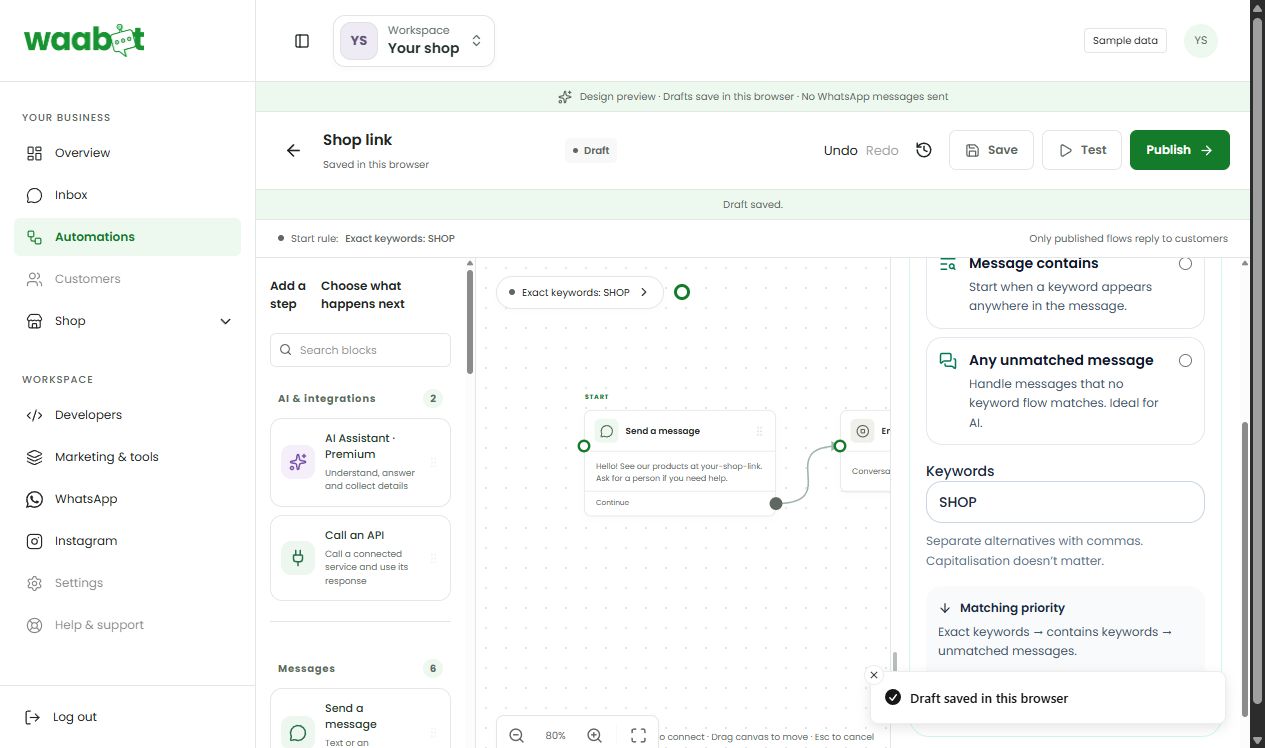
Open Automations in your dashboard and choose WhatsApp.
Choose Create your first flow (or the create option if flows already exist). Start a blank flow or a suitable template. Give it a clear name such as Shop link.
Set a keyword trigger to SHOP. Use the exact-match option for this first example.
Add a text message with your actual shop link.
Connect the trigger to the message and the message to an end step. Complete required settings.
Save the draft and use Test. Send SHOP in the tester and check the message and link.
Publish only after validation passes and the connection and assistant are ready.
From a different phone, send a new SHOP message. Check the real inbox and delivery status.
03Let a person help
A fixed flow follows the steps you set. An AI step generates an answer and can use credits. Start with the fixed flow, then add AI when you have useful business information to give it.
Use the inbox’s conversation controls when taking over manually. Resume automation intentionally when the person has finished. Publishing a changed draft updates future flow starts; a conversation already running can still use its earlier published version.
A little extra help
The tester works but nothing sends on WhatsApp.
A test simulates the flow. Check Publish, channel connection, assistant activation, matching keyword and account readiness for live use.
I edited the draft. Why does the old reply still appear?
Publish your changes. Also test with a fresh flow start: an existing session can retain the version it started with.
Dashboard links will ask you to sign in.