01First, make a DM reply
Open Automations and select Instagram.
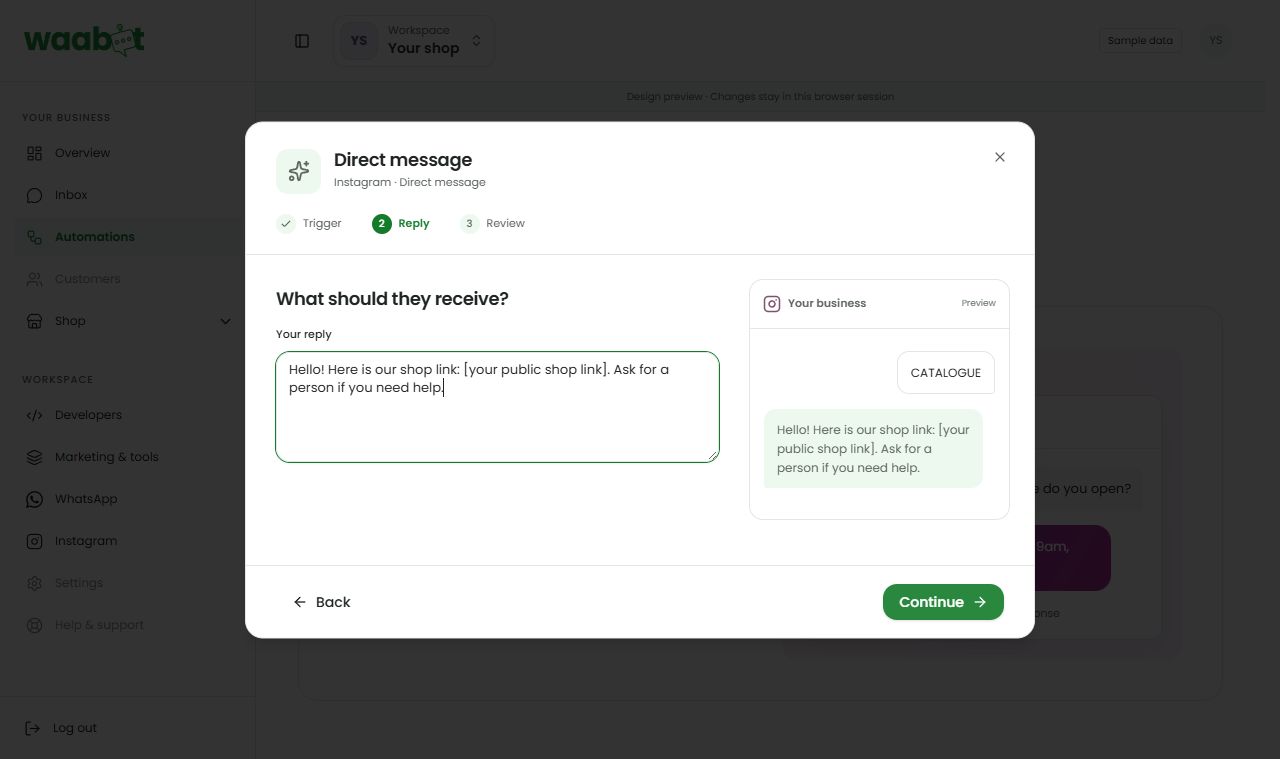
Create a flow. Choose Someone sends you a message, then Continue setup. Choose Start from scratch and continue. Enter CATALOGUE in the Keyword step. Uppercase and lowercase both work.
In Reply, write a short greeting and your actual shop link. Continue to Review and finish creating the draft. In the editor, keep exact matching for this example.
Connect the steps to an end. Save and run the path test.
Publish after validation passes.
Send a new CATALOGUE DM from a different Instagram account. Check the inbox and delivery result.
02Then, try comment-to-DM
Confirm that your Instagram connection has comment access.
Create a flow. Choose Someone comments on a post. Continue setup, choose a starting goal, then set a keyword such as PRICE.
Select all eligible posts or a specific post or reel that you own.
Use one private reply message, including the link you want to share. Keep the path to the supported single reply.
Test and publish. Leave a new matching comment from a different account on the chosen post.
Check the delivery result. Have the customer reply to the private message before trying normal DM follow-ups.
A private reply alone does not open the normal DM reply window.
03Know the boundaries
The current integration limits a private reply to one per eligible comment, within seven days of the comment. Sending it does not itself open a customer DM reply window. The customer must respond before normal follow-ups are available.
Do not test using an old comment, the connected business account, or a different post than the one selected. Requests for a person or stop pause automation. A test preview does not prove that Meta will deliver the live message.
A little extra help
My new comment did not receive a DM.
Check the keyword, post selection, comment permission, published flow and connection. Review delivery status before retrying.
Can I keep sending after the private reply?
Wait for a customer response. A private reply alone does not authorize normal follow-up messages.
Official references
Provider policies can change. Check the current requirements before connecting or sending.
Meta: Instagram private repliesDashboard links will ask you to sign in.